



The frustration of using software that doesn't react as expected is a universal feeling. That precise moment when an action yields no visible result or when a working document seems to have vanished creates an immediate breach of trust between the user and the product. In the SaaS world, these frictions are the first signs of definitive abandonment. To build interfaces that actually work, there is a solid theoretical foundation used by designers worldwide: Jakob Nielsen’s 10 heuristics.
Table of contents
What is a Heuristics Evaluation?
Before diving into the details, it is essential to understand the origin of this method. Heuristic evaluation is a user interface inspection technique developed by Jakob Nielsen and Rolf Molich in the early 1990s. Jakob Nielsen, often called the "King of Usability," refined these criteria in 1994 to arrive at the 10 golden rules we still use today.
Unlike traditional user tests that observe humans in real-life situations, a heuristic evaluation is performed by experts. It is a formidable approach: according to the Nielsen Norman Group, this method can detect up to 60% of usability problems right from the design phase. The goal is not just to make the interface look pretty, but to ensure it respects the cognitive capacities of users. By relying on these principles, it is possible to transform complex interfaces into fluid and high-performing tools.
Why Heuristics are Vital for SaaS Growth
In a subscription-based business model, user experience is not a luxury; it is a condition for survival. Every ergonomic friction is a hidden cost that weighs on your business in three different ways.
First, the cost of customer support. An interface that does not respect heuristics generates unnecessary tickets. If a user does not understand how to undo an action or feels lost in the navigation, they will reach out to your technical team. By optimizing usability, you drastically reduce your agents' mental load and the associated operational costs.
Second, adoption and retention. A SaaS with an overly steep learning curve suffers from high abandonment rates during the critical onboarding phase. Nielsen’s heuristics create an immediate sense of familiarity. The user feels competent within the first few minutes, which favors activation and limits early churn. This analytical rigor is what the merveilleUX agency applies in every intervention to guarantee concrete results.
Finally, perceived value. A fluid interface conveys professionalism and reliability. Conversely, a confusing interface degrades the user's trust in the quality of the service provided. Heuristic evaluation is therefore a direct lever to increase the "Lifetime Value" (LTV) of your customers.
Jakob Nielsen's 10 Heuristics
Applying these criteria requires a blend of technical rigor and empathy for the end user. These ten golden rules serve as a foundation for diagnosing interface efficiency and ensuring that every interaction remains logical and effortless. Here is the complete breakdown of these principles that make the difference between a complex tool and high-performing software.
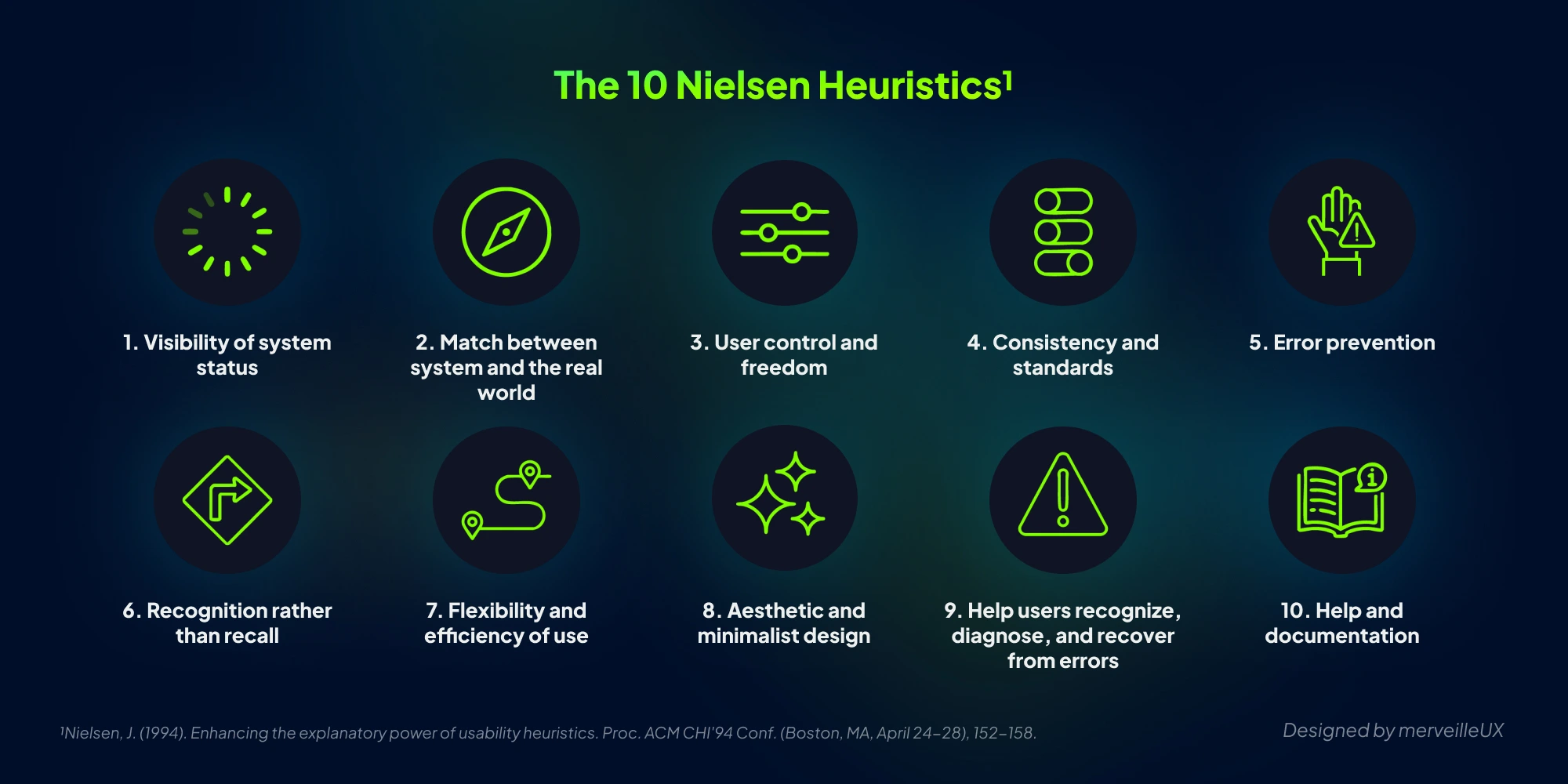
1. Visibility of System Status
The system should always keep users informed about what is going on, through appropriate feedback within a reasonable time. A user should never wonder if the system has taken their action into account.
In SaaS, latency is the primary enemy. When a user imports a massive file or launches a complex calculation, the system must show it is working. The use of progress bars, skeleton screens, or simple status messages helps reduce anxiety related to waiting. Without this feedback, the user risks refreshing the page, clicking the same button multiple times, or worse, thinking the application has failed.
2. Match Between System and the Real World
The system should speak the users' language, with words, phrases, and concepts familiar to them, rather than computer-oriented terms. Follow real-world conventions, making information appear in a natural and logical order.
For professional software, technical jargon should be cast aside. Instead of using database terms like "Row Deleted," use business-oriented language like "Project deleted." Visual metaphors are also crucial: a folder icon for organizing documents, a slider for adjusting a numerical value. The interface must adapt to the user's mental model, not the other way around.
3. User Control and Freedom
Users often choose system functions by mistake and need a clearly marked "emergency exit" to leave an unwanted state without having to go through a long and complex process.
The "Undo" function is one of the pillars of trust. In B2B SaaS, where errors can impact sensitive data, knowing that one can go back is liberating. It encourages software exploration. Close buttons on modals, "Cancel" links in forms, and the ability to exit an onboarding process at any time are essential elements to guarantee this freedom.
4. Consistency and Standards
Users should not have to wonder whether different words, situations, or actions mean the same thing. Follow platform and industry conventions.
Consistency is the key to predictability. It is divided into two categories: internal and external. Internal consistency ensures that visual elements and behaviors are identical throughout the application. External consistency ensures that your software respects market standards (for example, the logo in the top left to return home). To maintain this structure in the long term, implementing a SaaS design system has become an essential standard. Predictability reduces the learning effort and avoids common navigation errors.
5. Error Prevention
Even better than a good error message is a careful design that prevents the problem from occurring in the first place. Eliminate error-prone conditions or check for them and present users with a confirmation option before they commit to the action.
In a SaaS form, prevention happens through intelligent constraints: graying out a "Submit" button until required fields are filled, offering dropdown menus instead of free-text entry whenever possible, or requesting confirmation before an irreversible action. The goal is to reduce cognitive load by guiding the user on the right path.
6. Recognition Rather Than Recall
Minimize the user's memory load by making objects, actions, and options visible. The user should not have to remember information from one part of the interaction to another.
The human mind is not made to memorize complex IDs or obscure navigation paths. A good interface leaves visual clues. For example, if a user needs to configure an API integration, the interface should display instructions or format examples directly next to the input field. Search histories and "Recently Viewed" sections are excellent ways to apply this heuristic to boost productivity.
7. Flexibility and Efficiency of Use
Accelerators—unseen by the novice user—may often speed up the interaction for the expert user. Allow users to tailor frequent actions.
A SaaS must address several user profiles. The beginner needs to be guided by a clear and didactic interface. The expert, on the other hand, seeks performance. Introducing keyboard shortcuts (like the famous CMD+F for search), macros, or the ability to customize one's dashboard satisfies both extremes. This transforms a simple tool into a natural extension of the user's hand.
8. Aesthetic and Minimalist Design
Interactions should not contain information that is irrelevant or rarely needed. Every extra unit of information competes with relevant information and diminishes its relative visibility.
Minimalism does not mean an absence of features, but the prioritization of information. In complex SaaS, the temptation to show everything on one screen is great. Yet, visual clarity helps concentration. Strategic use of white space, legible typography, and progressive disclosure (showing advanced options only upon clicking) keeps an interface breathing and effective.
9. Help Users Recognize, Diagnose, and Recover from Errors
Error messages should be expressed in plain language (no codes), precisely indicate the problem, and constructively suggest a solution.
Absolutely avoid cryptic error codes like "Error 0x800456." Effective messages must be educational. For example: "We could not validate your credit card. Please check the expiration date or try another payment method." A good error message should not be a dead end, but a bridge toward resolution.
10. Help and Documentation
Even though it is better if the system can be used without documentation, it may be necessary to provide help. Any such information should be easy to search, focused on the user's task, and not be too large.
In SaaS, help must be contextual. Rather than a 100-page PDF, favor tooltips, an integrated help center with a search engine, or a well-configured chatbot. The user seeks a quick answer to a specific problem. The closer the help is to the action, the more effective it is.
How to Perform an Expert Heuristic Evaluation
Applying these principles cannot be improvised. At merveilleUX, we follow a rigorous methodology to guarantee a diagnostic's objectivity. This inspection generally takes place in three key steps.
First, defining the scope. You cannot audit everything at once. We identify critical paths (for example, the project creation flow or the payment funnel) that have the biggest impact on your conversion.
Second, the screening. One or more experts traverse the interface in isolation to avoid cognitive biases. Every friction encountered is noted and associated with one of Nielsen’s 10 heuristics.
Third, severity scoring. Each problem is evaluated according to three criteria: frequency, impact, and persistence. A minor problem that happens often can be more serious than a major problem that happens only once. This prioritization lets your product teams know exactly where to focus their efforts for maximum ROI. This is the very essence of our UX audit methodology for SaaS.
Why Choose merveilleUX for Your Audit?
The main obstacle to a good internal heuristic evaluation is "designer blindness." By working on your product, you eventually stop seeing obvious flaws. You know the shortcuts, you anticipate bugs, and you understand the jargon you created yourself.
The merveilleUX agency brings an external, fresh, and uncompromising perspective. We don't just point out what is wrong; we explain why it hurts your performance indicators and propose concrete redesign solutions.
Our SaaS expertise allows us to go beyond simple ergonomic theory. We understand the business stakes related to MRR (Monthly Recurring Revenue), CAC (Cost of Acquisition), and retention. Conducting an audit with us is an investment in your product's long-term solidity.
Conclusion: Don't Leave User Experience to Chance
Jakob Nielsen's heuristics are not old, outdated theories. They are the physical laws of the digital interface. Ignoring them is like building a house on quicksand. By respecting these principles, you create a product that feels natural, obvious, and indispensable for your customers.
Do you feel your interface could be smoother? Don't let your users get lost in the meanders of failing ergonomics. Our team is here to guide you and put your solution through the sieve of merveilleUX expertise.
Take Action for Your SaaS
-
Discover our comprehensive UX audit service.
-
Contact us to discuss your challenges.
-
Check out our article on optimized SaaS navigation.
Your software deserves an interface that matches its technology. Together, let's make it merveilleUX.